Is Your Next PC an AI-Powered Wonder?
Imagine turning on your computer, and it instinctively knows what tasks you have today and tailors its suggestions to those activities. Welcome to the world of AI-powered PCs, where artificial intelligence is not just a feature, but a gateway to revolutionary change in computing. This blog post will navigate through the transformative benefits and sophisticated tech behind AI-PCs, encouraging a journey into a future where machines are smarter than ever before.
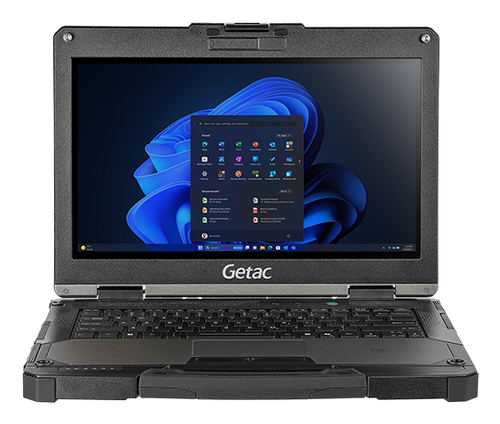
What Makes an AI-PC Stand Out?
At the heart of AI-PCs are specialized co-processors designed to handle complex machine learning tasks with ease. These machines boast superior processing power that was once the stuff of science fiction. For instance, many Lenovo models integrate AI co-processors that process data points faster than traditional CPUs. This means applications can run more smoothly and intuitively adapt to user behavior over time.
Another fundamental feature is the AI-driven graphics rendering capability. Think about how Microsoft incorporates AI in its Surface lineup to balance performance with aesthetics. With these advancements, even graphic-heavy tasks are now a breeze, turning ambitious ideas into reality without buckling under pressure. While typical PCs focus on raw power, AI-PCs also emphasize smarter computing. By recognizing patterns in user interaction, they optimize system settings in real-time, improving everything from battery efficiency to cooling mechanisms. Imagine the convenience of your PC adjusting its settings to suit your needs, ensuring optimal performance consistently. The ramifications of such technology, from reducing energy costs to improving lifespan, demonstrate why AI-PCs often stand head and shoulders above their more mundane counterparts.Revolutionizing Daily Tasks with AI PCs
AI-PCs are designed not only for power but for enhancing everyday efficiency. With features like adaptive battery management, these machines predict power usage, extending battery life without a hitch. One might find themselves finishing work without that familiar scramble for the charger.
Smart task management is another game-changer. Through experiential learning, the PC learns which applications you use most and allocates resources accordingly, streamlining operations. It’s like having a digital assistant who knows you’re about to pull out Excel for those budget reviews and preemptively preps the necessary files. In terms of security, these PCs are no slouch. AI adds an extra layer of protection by understanding usual patterns and alerting when abnormalities occur. In practice, you might receive a heads-up about a suspicious email, reflecting a growing trend toward intelligent cyber safety measures in the industry. As someone who’s experienced the chaos of cumbersome security protocols, this smart approach feels like a breath of fresh air. Ultimately, weaving AI into daily computing turns potential disruptions into smooth sailing, making it a technology often worth considering.Unleashing Creativity and Efficiency
For creatives, AI-PCs open doors to possibilities that were once impractical in a standard setup. With enhanced graphics rendering capabilities, designers can manipulate high-resolution images and complex animations in real time, an endeavor that could bog down lesser machines. Imagine using tools on an intuitive platform, where processes that took hours now take minutes.
Content generation is another field ripe for AI transformation. These PCs often come with features that assist in generating ideas or refining drafts, thus boosting productivity. In real-world scenarios, writers like myself might leverage AI suggestions to overcome writer’s block. It feels as if the machine itself becomes a partner in the creative process, offering new perspectives when you hit a creative wall. Industry adoption is rapidly climbing, with fields like video editing witnessing marked improvements. AI algorithms optimize render times, allowing professionals to focus more on creation than computation. It’s a trend that shows no signs of slowing, and one that many professionals, including myself, find invaluable when deadlines loom large. Whether you're dabbling in graphics or leading major projects, the AI-PC often becomes more than a tool—it’s a collaborator.AI-PCs: Are They Right for Everyone?
Choosing an AI-PC can seem daunting but understanding who will benefit most is vital. Those engaged in demanding tasks, like video editing or software development, may find the leap in performance revolutionary. Meanwhile, casual users might find it overkill—after all, it's about matching capabilities with needs.
It’s important to weigh the costs versus the benefits of these premium devices. For some, the investment pays dividends in boosted productivity and innovative features. However, for the average user who primarily surfs the web or streams videos, the heavy lifting that AI-PCs offer might not be necessary. In my experience with students and general users, a balance often works best. If your tasks demand more, the power and adaptability of AI-PCs make them a sound investment. Conversely, for simpler needs, traditional PCs may still offer sufficient horsepower at a better price point. Hence, thoroughly assessing what you need versus what you might want is crucial in making savvy tech investments. This nuanced approach allows you to sidestep paying for underutilized potential, an all-too-common pitfall in tech purchases.Head-to-Head: Lenovo IdeaPad Slim 3 vs. Microsoft Surface Laptop 7
When examining two leaders in the AI-PC space, the Lenovo IdeaPad Slim 3 and Microsoft Surface Laptop 7 stand out. The Lenovo model offers robust processing power suitable for intensive business tasks, boasting a dynamic range of storage options. It’s typically favored in environments requiring multi-tasking prowess.
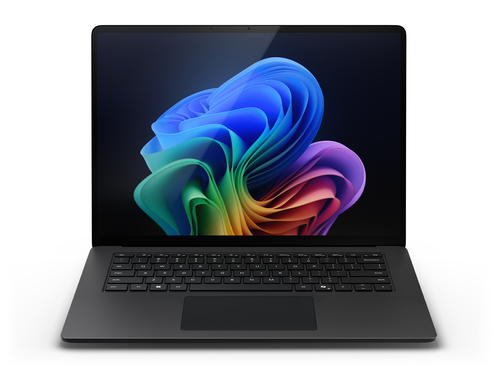
On the other hand, the Surface Laptop 7 is known for its user-friendly experience, with a standout feature being its adaptive battery life. This laptop leans towards creative applications, especially with its vibrant display and precision touch capabilities. Both models use AI to enhance performance, yet their distinct strengths cater to different user bases—business professionals lean towards Lenovo, while creatives often prefer Microsoft. Each choice ultimately hinges on specific needs, whether that’s business resilience or creative elegance.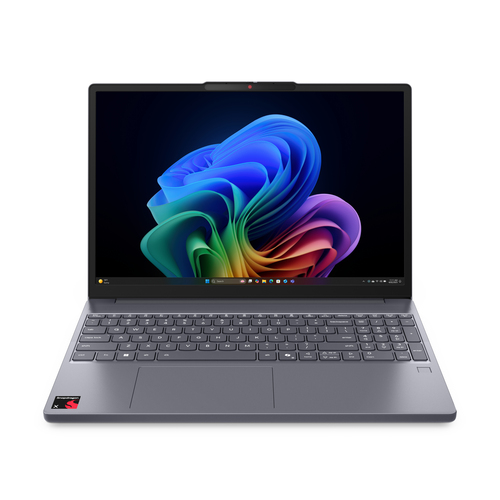
Getting Started with Your AI-PC
Setting up your new AI-PC is an exciting journey. First, unbox your device and connect peripherals as needed (e.g., ergonomic add-ons look at this setup). Next, configure initial settings—most devices guide you through a setup wizard that helps activate essential AI features. In my experience, personalizing these settings ensures maximum efficiency from the get-go.
Dive into the settings to optimize for adaptive battery life and customize AI-driven security features to your liking. Don’t forget to explore vendor resources for help, such as the Lenovo website, where tutorials abound. Additionally, consider exploring community forums that offer insights on unique use cases. You’ll typically find both traditional instructions and creative workarounds inspired by everyday user interaction. Embrace the flexibility and make your AI-PC feel truly yours.Conclusion
AI-PCs embody a transformative leap in technology, poised to redefine user expectations with their unparalleled blend of power and intelligence. From enhancing creativity to bolstering everyday efficiency, these machines adapt to and learn from your habits, introducing convenience in ways that standard PCs just can’t.
While the decision to embrace this new wave ultimately depends on individual needs, it’s clear AI-PCs offer a future-proof solution for those facing demanding computational tasks. Encouraging personalization and seamless integration into existing workflows, these computers invite users to explore possibilities beyond conventional computing. Staying informed about advancements ensures you’ll make choices that keep pace with innovation. For those ready to explore more or contemplating an upgrade, diving into the [AI PC] might be just the starting point you need. Who knows what your next PC could unlock in your personal or professional life?Frequently Asked Questions
Common questions about AI PC